 RouterLightsFix
Why Is My Internet Not Working? How to Find the Problem and Fix It
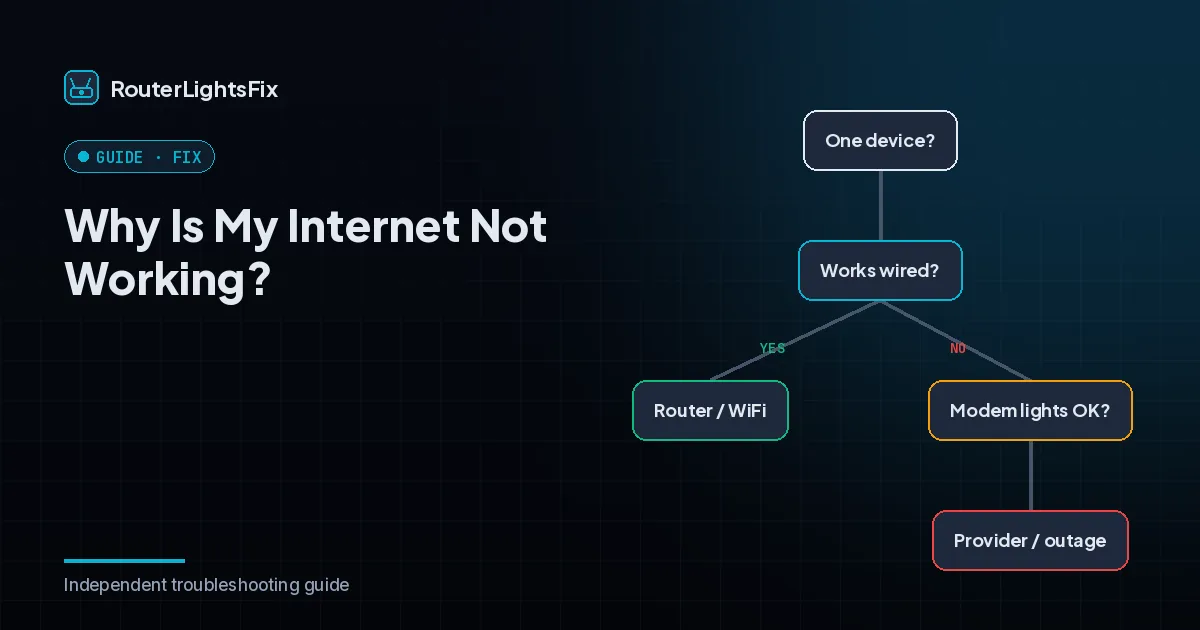
When the internet goes down, the fastest way to fix it is to find out where the problem is: your device, your router, your modem or your provider. This page gives you a simple order of checks that isolates the problem and then ten fixes.
Step one: how many devices are affected?
If only one device is offline, the problem is that device. If everything is offline, the problem is your router, modem or provider. Try a second device, and if you can, connect a computer directly to the modem with an Ethernet cable. If the wired computer works, the router is the problem; if it does not, look at the modem and the provider.
10 fixes for internet that is not working
1. Check for an outage
Use your provider's app or outage page on mobile data. If there is an outage, wait.
2. Read the lights
Look at the modem and router lights. Red, off or blinking usually means no connection. Our router and modem lights guide explains the common colors.
3. Check every cable
Press the coax or phone line into the modem, the Ethernet cable into the modem and router, and the power cords into the devices. Remove splitters if you can.
4. Restart the modem, then the router
Unplug both for 60 seconds. Plug in the modem, wait for its online light to settle, then plug in the router. See how to restart a router and how to reset a modem.
5. Test a wired connection
Plug a computer into the modem or router with an Ethernet cable. This separates WiFi problems from internet problems.
6. Fix a single device
Turn WiFi off and on, forget the network and reconnect, restart the device and turn off any VPN or airplane mode.
7. Check for WiFi connected but no internet
If the device says connected but pages will not load, the router is not reaching the internet. Restart the modem first. If the modem is solid and the router is fine, try a different DNS server on the device.
8. Check for overheating and placement
Move the modem and router into open air away from other electronics. Heat causes drops.
9. Reset as a last step
If nothing has worked, factory reset the router (not the modem, unless your provider advises), then set up your WiFi again.
10. Contact your provider
Tell them what you tried and what the lights show. Ask them to check signal levels and to replace failing equipment.
Provider-specific help
If you are on Spectrum, see our guide to Spectrum WiFi not working. If you are on Xfinity, read Xfinity WiFi not working. Our Cox, AT&T, Optimum, Frontier, Fios and CenturyLink pages cover restarts and lights for those providers.
Prevent it from happening again
Keep the equipment cool and uncluttered, restart occasionally, replace equipment that is more than four to five years old and keep your provider's app installed so you can check for outages quickly.
The bottom line
Work out how many devices are affected, check for an outage, read the lights and cables, and restart the modem before the router.
Frequently asked questions about why is my internet not working
Why is my internet not working?
The cause is usually one of four things: a provider outage, a modem that lost its connection, a router that needs a restart or a problem with one device. Test which one by checking other devices and the lights.
Why does my WiFi say connected but there is no internet?
Your device reaches the router, but the router cannot reach the internet. Restart the modem first, then the router, and check for an outage.
How do I know if it is an outage?
Check your provider's app or outage page on mobile data. If it reports an outage at your address, wait for service to return.
Should I call my provider?
Call after you have checked for an outage, restarted the modem and router in order and checked the cables. Tell the agent the steps you tried.
Why is only one device offline?
Then the problem is on that device or its connection to the router. Toggle WiFi, forget and reconnect to the network and restart the device.